Farming, upgrades, Builder Base, Clan Capital and multiple accounts — automated with the rules you choose, on LDPlayer 9 and MuMu Player.
SET IT YOUR WAY
A routine with a plan.
Choose loot filters, your army and upgrade priorities. Review results and logs for every account.
RIGHT WHERE YOU PLAY
Your emulator gets a co-pilot.
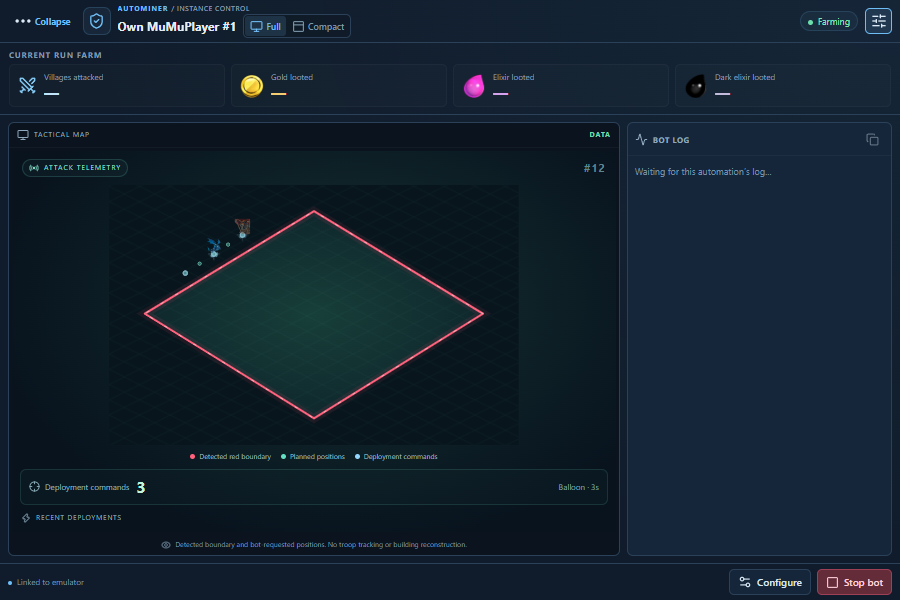
An attached panel keeps instance controls, logs and session results close to the emulator. Expand it when you need the details. Keep it compact when you do not.
Ready to see it working?
Explore the real interface in your browser, or choose the plan that fits your routine.
Product interface languages: English, Portuguese and Arabic.Multiple instancesAttacksUpgradesResults & logTAKE THE CONTROLSExplore the actual AutoMiner.The same screens and controls used by the desktop app. Explore farm settings, attack options, upgrades and the instance manager.INTERACTIVE DEMOActual interface · demo modeProduct screenshotTry it yourselfUse the controls inside the real interface below. Changes stay in this demonstration.Original desktop controls with example data. Changes stay in this page; game operations run in the installed application.Example accountMain villageSecond accountThird accountPausedSimulatingStart simulationPause simulationReset demoReady to exploreAccount selected. Its example settings are independent.Simulation started for this example account.Simulation paused for this example account.One account at a time. All in one place.Select an account, start its simulation and switch to another. Its state and settings stay separate.Give your search a target.The minimum below applies to gold and elixir. Require both or accept either, and watch the target decision change.Minimum per resourceRequire both gold and elixirExample search filter updated for this account.Decide where your loot goes.Try the categories and resource reserve. These are examples of the options available in AutoMiner.Upgrade categoriesWallsBuildingsHeroesResearchGold reserveSelected categoriesNo categories selectedExample upgrade categories updated.Example resource reserve updated.Watch your session take shape.Run the simulation automatically or advance one step at a time. Attacks, loot and logs update together.SearchFilterAttackResultsThe routine searches for a village using your configured preferences.Loot and village filters decide whether a target matches your settings.The configured army and deployment preferences guide the attack.Recorded attacks, loot and logs help you review each account’s session.Next example stepRestart example cycleExample workflow advanced.Enlarge screenshotClose screenshotExplore screenshot detailCurrent stepInstance listPer-instance settingsGroup controlsEach detected instance has its own row and status.Configuration belongs to the selected instance.Group commands follow the selected emulator and selected rows.Attack preferencesStrategy and deploymentSession controlsConfigure the attack before starting the routine.The product provides army and deployment preferences.Start and stop controls belong to your configured session.Wall automationResource reservesUpgrade typesSet how often walls are checked and the per-run limit.Keep a resource reserve when configuring upgrades.Choose supported wall levels and upgrade categories in the product.Session totalsAttack historyActivity logExample totals bring the recorded resources together.Each row records the outcome of an attack.Logs help explain the current activity and any errors.FarmReduce interfaceEnlarge interfaceInteractive workspaceView real interfaceActual product screenshot · view onlyEXAMPLE DATASimulation controlsStart runs the example automatically. Pause to explore each step.Advance one stepAnother targetExample targetMatches your filtersBelow your minimumFilter decisionGoldElixirDark elixirAttacksSkippedUpgradesExample armyDragonsValkyriesExample army updated.Target found. Checking the example resources.Target skipped: your minimum was not met.Filters passed. Deploying the example army.Example attack finished. Loot added to this session.Searching for the next example target.Switched to another example target.No upgrade fits the selected categories, balance and gold reserve.Example upgrade completed.Category is offNot enough example resourcesGold reserve protectedReady to simulateSimulate next upgradeSimulate upgradeExample balanceUpgrade optionsCompleted in this demoAttack historyActivity logCopy logLog copiedClear logLog cleared for this example account.Select and copy the log below.Your actions appear here. Start a simulation or advance one step.No attacks yet. Complete a simulated cycle to add the first result.ConfigureSelected accountIllustrative village with a deployment boundary and troop movementChange the settings below and see the result above.ONE ROUTINE. YOUR RULES.Less repetition.
More progression.Set up the way you play. Follow every step from the same command center.Your AutoMiner workspaceActual interface · example dataExplore these settingsChoose a step to explore the actual product screens.01 / FIND02 / ATTACK03 / UPGRADE04 / FOLLOWChoose the villages worth your time.Your army. Your strategy.Give your resources a purpose.Know what every account is doing.Loot filters & village selectionArmy & deployment preferencesCategories, budgets & reservesSession loot & activity logsA GOOD SETUP CHANGES EVERYTHINGReady for your
next session.A few clear settings. A compatible emulator. Everything in the right place before the first run.Your Windows PCWindows 10 / 11 · 64-bitGame resolution860 × 672 · 160 DPIGame languageClash of Clans in EnglishLocal connectionADB enabled · internet availableChoose your emulatorRECOMMENDED CONFIGURATIONUse LDPlayer 9. Enable the local ADB connection in the emulator settings.Use MuMu Player. AutoMiner manages the local ADB connection automatically.Open the setup guideNeed a hand?Full instructions for installation, activation and emulator setup.RESOLUTIONDENSITYCONNECTIONLocal ADBWINDOWS EDITIONOpening the AutoMiner interface…The interface could not be loaded.Try again to explore the actual controls. Your game and settings are not connected to this demonstration.Reload interfaceLoading interfaceExplore AutoMinerNavigation menuAutoMiner licenseChoose your access durationCompare all plansBack to passesPrevious planNext planYOUR AUTOMINER ACCESSYour next level.Starts here.Every feature. One Windows PC. Choose how long you stay.THE OFFICIAL AUTOMINER COMMUNITYA real place to turn to.Setup questions, help with your license, or an unexpected issue. Find the AutoMiner team and community on our official Discord.Join the official serverRead the setup guideOfficial AutoMiner serverSUPPORT · UPDATES · COMMUNITYSetup & emulatorsLicense & purchaseReport an issueTell us what happened.Share your AutoMiner version, emulator and the relevant log so the team has the context to help.Prefer to follow a guide?The configuration reference and common questions are just below.AUTOMINER · MADE FOR WINDOWSYour village.On your terms.A little less routine. A little more room for the game you enjoy. Bring farming, upgrades and your accounts together — with you in control.Meet AutoMinerTry the interfaceWindows 10 / 11 · LDPlayer 9 + MuMu PlayerYour command centerActual interface · example dataONE WORKSPACE. YOUR ACCOUNTS.THOUGHT THROUGH, FROM THE STARTThe details make the difference.A routine that follows your rules.Choose loot filters, your army and upgrade priorities. AutoMiner works with the preferences you save.Every account has its own space.Separate settings, session results and logs. An attached panel keeps controls beside each emulator.Progress you can actually follow.Review recorded attacks and loot, see what happened in the logs, and adjust your next session.See all featuresTHERE IS MORE TO YOUR VILLAGEThe rest of your routine, considered.Builder BaseKeep a separate routine for the Builder Base, including the option to farm it on its own.Clan Capital · BetaRaid Weekend attacks, Capital Gold contributions and collection of the Forge’s free gold.Telegram controlsReceive reports and start or stop your configured instances from your existing Telegram connection.Explore instance controlsHomeFeaturesDemonstrationPlansSupportFind what you needEmulator setupDownload & updatesCommon questionsA LITTLE HELP GOES A LONG WAYLet’s get you settled.A setup question, an update or something that does not look right? Bring it to the official AutoMiner community.Talk to us on DiscordNeed help with the real setup?Open the setup guideEVERYTHING AUTOMINER DOESOne bot.Your whole village.Farming, upgrades, Builder Base, Clan Capital and multiple accounts — automated with the rules you choose, on LDPlayer 9 and MuMu Player.Multiple accounts and instancesFeature categoriesNewFarming & attacksFinds the right village and brings the loot home.Loot filtersSet minimum gold, elixir and dark elixir. Villages below your targets are skipped automatically.Three attack plansStandard, Valkyrie + Earthquake and Electro Dragon + Balloon, each with its own deployment.Smart deploymentTroops land on safe points outside the red line, adapted to each village layout.Heroes and abilitiesHeroes and the Grand Warden join with a natural rhythm and use their abilities on time.Spells and siege machinesRage, Freeze, Earthquake and more are cast where they count, and siege machines join the attack.Ends when the loot stopsWhen resources stop coming in, the battle ends and the next search starts — less time per attack.Your saved armyTrains your saved army recipe and can request or donate Clan Castle troops.Collects everythingGold mines, elixir collectors, dark elixir drills and the Loot Cart, every cycle.Stays out of warIf the war map opens instead of a search, the bot backs out without attacking.UpgradesSpends your resources the way you would.Buildings by categoryDefenses, resources, army, heroes and more, with a priority planner and an optional Town Hall upgrade.WallsOne wall level or multiple levels, with gold and elixir reserves, and early upgrades when storages are almost full.Laboratory queueResearches troops, spells and siege machines in your P1, P2 and P3 order.Pet HouseUpgrades pets with dark elixir whenever the Pet House is free, with its own reserve and pet queue.Skip superchargesLeave supercharge upgrades for when you decide.Never spends gemsConfirms only with gold, elixir or dark elixir. Gems, the paid Goblin builder and the Hammer of Heroes are never used.Event discountsReads discounted prices during events such as Hammer Jam and keeps upgrading.Builder reserveKeep a builder free for walls or for your heroes when you want.Builder BaseA second village with its own routine.Builder Base attacksAttacks in the Builder Base on its own interval.Upgrades and laboratoryBuilder Base buildings and research, with their own reserves and priority queue.Builder Base onlyFarm only the Builder Base and skip main-village attacks.Boat and Elixir CartTravels between the villages by boat and collects the Elixir Cart.Clan & eventsYour clan’s side of the game, handled too.Clan Capital · BetaRaid Weekend attacks on every account, with a target priority you choose.Capital GoldContributes Capital Gold to Capital upgrades after raids or when it fills up.ForgeCollects the free Capital Gold from the Forge every day.Clan GamesChooses Clan Games challenges that fit your farming.Accounts & instancesMany villages, one place.Multiple accountsSwitches between your Supercell ID accounts, each with its own profile and settings.Multiple instancesRuns several LDPlayer or MuMu instances at once, started one at a time to protect your PC.A panel on every emulatorStart, stop and configure each bot from a panel attached to its emulator, with the live game and log.Farm goalsStop or switch account when a gold, elixir or dark elixir target is reached.Schedule and breaksPlay only within your hours, with breaks and random variation.Session timeSee how long every instance has been running.Results & controlAlways know what happened.Loot statisticsAttacks, skipped villages and loot per attack and per hour, for every account.Clear logsEvery action described in plain language, in English, Portuguese or Arabic.TelegramReports and errors on Telegram, and remote start or stop for your instances.Reliability & safetyBuilt to keep going.Recovers by itselfReopens the emulator and the game, reconnects and handles game pop-ups and maintenance breaks.Freeze watchdogNotices a frozen game or emulator and restarts it.Human rhythmVaried timing and touch positions instead of fixed, robotic taps.Safe updatesSigned one-click updates that keep your accounts and settings, with a way back to the previous version.SEE IT FOR YOURSELFReady to see it working?Explore the real interface in your browser, or choose the plan that fits your routine.Try the interfaceSee plansAUTOMINER / CONTROL CENTERAUTOMINER / COMPANIONAutoMiner 1.2.6 — Results & LogAutoMiner companion panelTranslated from EnglishWall upgradesMultiple accountsFarming sessionsCommunity feedbackReal messages from the AutoMiner Discord community.Discord communityCommunity messageView originalIndividual experiences shared by users. Results vary.Pause testimonialsPlay testimonialsTHE AUTOMINER ROUTINEFarmUpgradeResultsIllustrative automation flowAUTOMINER 1.2.6Your village.Next level.The grind has a new owner. Put farming, upgrades and your accounts on one command center. Get back to the part you enjoy.Find your planExplore the interfaceMade for Windows · LDPlayer 9 + MuMu PlayerTHE CURRENT INTERFACEProduct screenshots · demonstration dataYour accounts. Your settings.Independent controls for every instance.THE COMMAND CENTERMore accounts. Same control.Explore the actual AutoMiner interface. Click a view to see how each part of your routine comes together.Multiple instancesKeep every account in its own lane.Detect your emulators, configure each account and manage everything from one place.Your attack, configuredChoose the army. Set the rules.Set your loot filters, deployment strategy and battle preferences before you start.Make your resources countPriorities, budgets and reserves.Configure walls, buildings, heroes and research around the upgrades that matter to you.Your progress, visibleResults and logs, side by side.Review attacks, recorded loot and activity without losing track of which account is running.Previous viewNext viewPause tourPlay tourViewThese are screenshots of the current product with demonstration data, not a live session or a performance guarantee.RIGHT WHERE YOU PLAYYour emulator gets a co-pilot.An attached panel keeps instance controls, logs and session results close to the emulator. Expand it when you need the details. Keep it compact when you do not.Full dashboard or compact controlsA separate log for each instanceControls that follow the emulator windowCompanion panel · illustrative telemetryPause motionResume motionSCROLL TO EXPLORECLASH OF CLANS. LESS REPETITION.YOUR ROUTINE, CONNECTEDFind. Attack. Repeat.Filters + configured armiesPut your loot to workWalls · heroes · researchSET IT YOUR WAYA routine with a plan.Choose what happens, when it runs and where your resources go.Find your targetSet your minimum loot and village filters. Let the search follow your rules.Send your armyChoose a strategy and deployment style. Troop and hero checks stay part of the routine.Keep buildingSet upgrade categories, resource reserves and builder limits for the progress you want.Stay in the loopReview session results and logs. Use schedules and Telegram controls for your configured accounts.Illustrative workflow · not a live battleDEPLOYMENT AREARESOURCE PRIORITIESROUTINE OVERVIEWBE PART OF ITYour village. Our community.Ask a question, follow the updates or show us your setup. The AutoMiner Discord is where it all comes together.Meet us on DiscordSETUP & SUPPORTA little help goes a long way.Installation, activation and emulator settings. Find guidance in the official community.PRODUCT UPDATESKeep up with AutoMiner.Release notes, fixes and new features — follow what is changing.YOUR FEEDBACKHelp shape what comes next.Share your experience, report an issue and tell us what would make your routine better.FROM THE COMMUNITYIn their own words.Previous reviewNext reviewngl best botTook 100 walls from th16 to th18 level in 1 day pretty much. Can vouch for it, awesome stuffThanks for walls upgrades, now I'm closing the bot, it was need 300 and more than that attacksThe bot is very good.works good been going for almost 6 hours straight no issuesMultiple accounts support working 🙏❤️Bot is too powerfull super and crazy
I have activated the bot almost a whole day.
It works absolutely fine, i know it has some bugs and glitches, which I hope will be fixed in the next patch updates.